
How do I change my plan length?
From the Belle care team · Updated
You can change your plan length yourself in the patient portal. You'll see the plan lengths available for your treatment, and the price for each, before you confirm anything.
How to change it
- Sign in and select Treatments (on a phone, tap My Plan at the bottom of the screen).
- Under Your plans, select Manage next to the treatment you want to change.
- Select Upgrade my plan. You may also see this button on your plan card on the Home page.
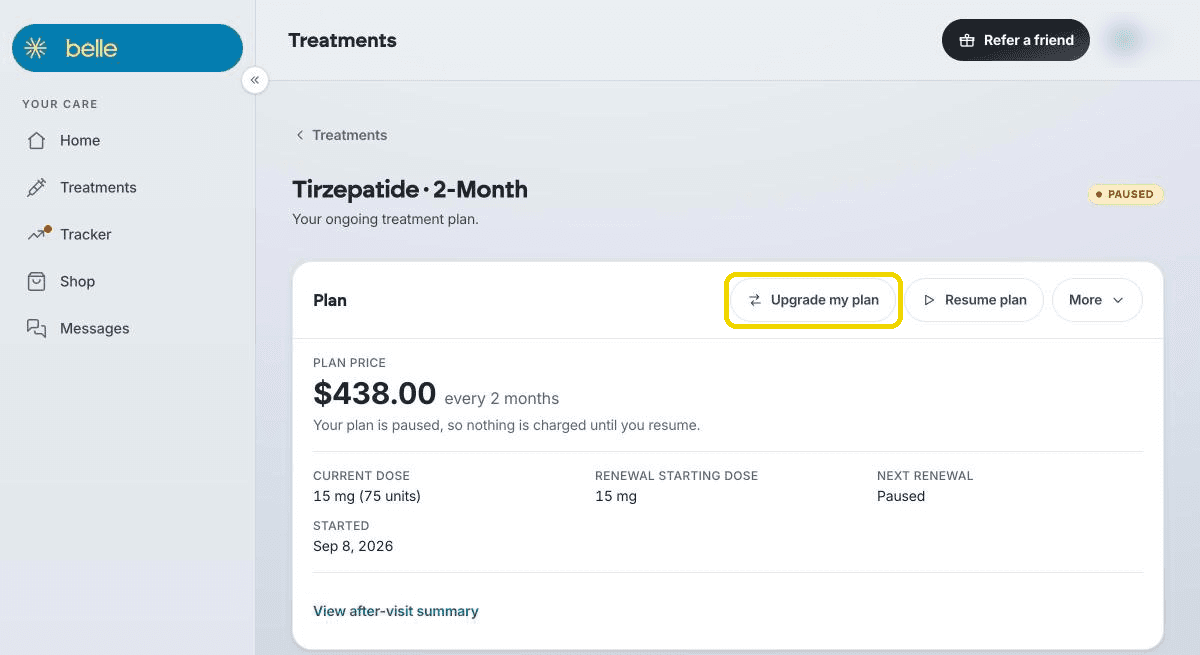
- In the Change your plan length window, pick a plan under New plan. Each option shows its price.
- Have a code? Select Have a promo code?, enter it, and select Apply.
- Select Switch plan (or Keep my plan to leave things as they are). You'll see Your plan is updated. It starts at your next renewal.
A few things to know
- Nothing changes for your current term. Your new plan starts at your next renewal, and that's when your card is charged the new price.
- If your plan is paused, the new plan starts at your first renewal after you resume.
- Options depend on your treatment. For example, a GLP-1 plan may offer 2-month, 6-month and annual lengths. Other treatments run on their own schedules.
- If you don't see Upgrade my plan, your treatment doesn't have another plan length to switch to.
- Pricing varies by plan length. The window shows your exact price for each option before you confirm.
Not sure which option fits you best? Select Message us in that window and we'll walk through it together.
Need help? Select Messages in your portal (on a phone, tap the chat bubble) and we'll help.
More in Account and billing
- Where do I see my shot history and track my weight? (The Tracker tab)
- Your saved card didn't move to the new portal: how to re-add it
- How to update your payment method or fix a failed or declined payment
- How to get a receipt or invoice (HSA / FSA)