
Account and billing
Your saved card didn't move to the new portal — how to re-add it
Updated Aug 28, 2026From the Belle care team
When Belle moved to its new patient portal, almost everything transferred over — your treatment, your plan, your history. The one thing that did not transfer was your saved payment method. That's why you may see a message that your card isn't on file, even though the card itself is still valid and your prescription hasn't changed.
Re-adding your card takes a minute and keeps your next shipment on schedule.
How to add your card
- Go to portal.joinbelle.com and sign in — enter your email and we'll send you a 6-digit sign-in code.
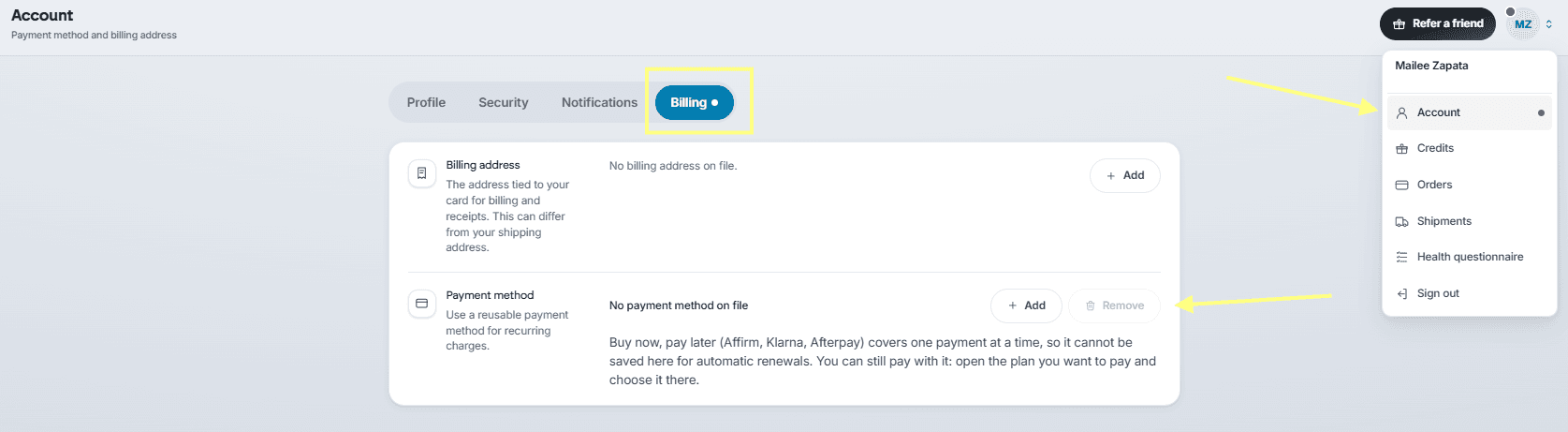
- In the top right corner, click the person icon and choose Account.
- Open the Billing section.
- Add your payment method there. You can also remove an old one from the same place.
Good to know
- This is expected after the move — it doesn't mean anything is wrong with your account or your card.
- Everything else is still there. Your plan, dose, and shipment schedule carried over; only the card needs re-entering.
- Add your card before your next renewal date so your shipment isn't delayed.
- Prefer to pay another way? Options like Affirm and Klarna are available at checkout too.
If you don't see a way to add a card, or the page looks different from these steps, message us and we'll walk through it with you.
Was this article helpful?