
Where do I see my shot history and track my weight? (The Tracker tab)
From the Belle care team · Updated
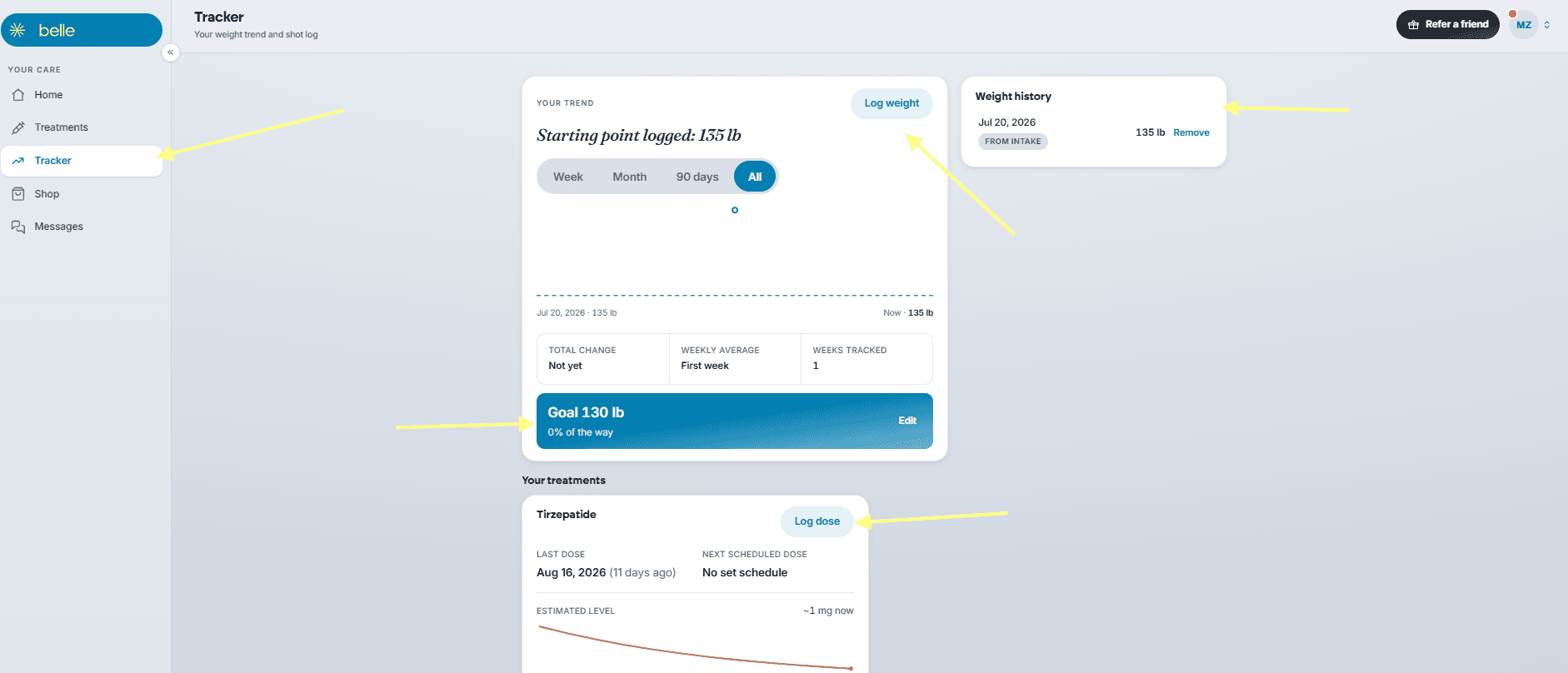
Your patient portal has a Tracker tab where you can log your shots, track your weight, and see your progress over time. On a computer, it's in the menu on the left. On a phone, it's in the bar at the bottom of the screen.
The Tracker part of this video starts at 1:30. The portal may look a little different from the video.
Your shot log
The Shot log is where your shots live, both the ones we have on record and any you add yourself. Each entry shows the date, the medication, the dose, and the injection site, so you can look back at your history and remember which side you used last.
To add one, tap Log dose on your treatment and fill in:
- Medication and Dose
- Date (and the time, if you want)
- Your weight, if you'd like to log it at the same time
Open More options to add:
- How do you feel?: quick tags like Nausea, Tired, Energetic, Food noise, Appetite suppression, or Heartburn
- Injection site: for example upper abdomen, thigh, or arm, left or right
- A note
If you're on more than one treatment, you can filter the log by treatment.
Logged the wrong amount? Open that shot in your Shot log and edit it, or message us and we'll fix it.
Your weight trend
In the Your trend section, select Log weight to add a weigh-in, or Set goal to set a goal weight. Once you've logged a couple of entries, you'll see:
- A trend chart you can view by Week, Month, 90 days, or All
- Your Total change, Weekly average, and Weeks tracked
- A Weight history list of every entry (you can remove one if you logged it by mistake)
If your history looks empty or incomplete
Your history from our previous tracker has moved over. Weigh-ins from it are marked From your previous tracker in your weight history. If anything looks off, send us a note in Messages and we'll help.
Want to start logging? Open Tracker and tap Log dose or Log weight.
Need help? Send us a note in Messages in your patient portal.
More in Account and billing
- Your saved card didn't move to the new portal: how to re-add it
- How to update your payment method or fix a failed or declined payment
- How to get a receipt or invoice (HSA / FSA)
- Refills, reorders, and renewals: how your next shipment works