
Did you get a cancellation notice? What it means during the portal move
From the Belle care team · Updated
If you got a cancellation email around the time Belle moved to its new patient portal, or your portal shows your plan as cancelled, your treatment hasn't stopped. This is an expected part of the move, and there's nothing wrong with your account.
Why you got the notice
Belle moved to a new patient portal in August 2026. As part of that move, your plan on the old system was closed and recreated in the new portal. The old system sends its standard cancellation notice when that happens. It looks alarming, but it's about the old record, not your treatment, which carries on.
The one thing to do: add a payment method
Payment details didn't transfer from the old portal, so your new plan may be waiting on a card. Sign in at portal.joinbelle.com with the 6-digit code we email you (see How to sign in or log in to the Belle patient portal). Then:
- Click your initials in the top right.
- Select Account.
- Open the Billing tab and add your payment method.
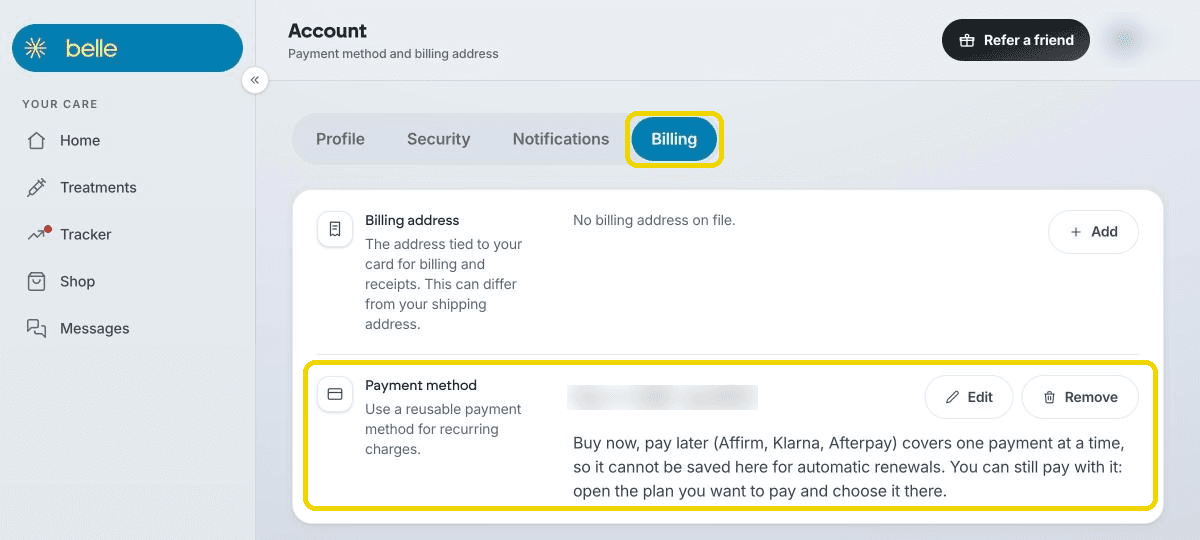
For more help, see How to update your payment method or fix a failed or declined payment.
How to check everything is fine
Once you're signed in, open Treatments (on a phone, My Plan). If your plan shows there and a payment method is on file, you're all set: no gap, no restart.
If something still looks wrong
If you've added a payment method and your plan still shows as cancelled, or you think your plan was cancelled for a different reason, send us a note in Messages and a person will look at your account directly.
Need help? Send us a note in Messages in your patient portal.
More in Getting started
- Does Belle offer hormone therapy (HRT), and how do I start?
- What treatments does Belle offer?
- Starting Belle or switching from another provider: what do I need?
- How does Belle's telehealth service work?